MCP
In progressOnly scans and lists MCP servers already found. It does not install them or change each tool’s settings. Write and manage are not built yet.
Open Source · MIT · v0.4.14
One GUI and one CLI to manage AI coding agents: install environments, logins and connections, Skills, usage, and local sessions.
01 — Product
AgentHub is a local-first multi-agent desktop tool. It manages different AI coding agents through one GUI and one CLI.
When several AI coding agents are used together, install dependencies, logins, Skills directories, and usage stats are usually scattered across tools. AgentHub puts install, login and connection, Skills, usage, projects, and sessions in one place.
It does not replace Claude Code, Codex, Kimi Code, or the other tools. The workbench makes each tool’s differences explicit, then puts common actions together. Install steps and capability limits follow the GitHub repository README and the source.

02 — Features
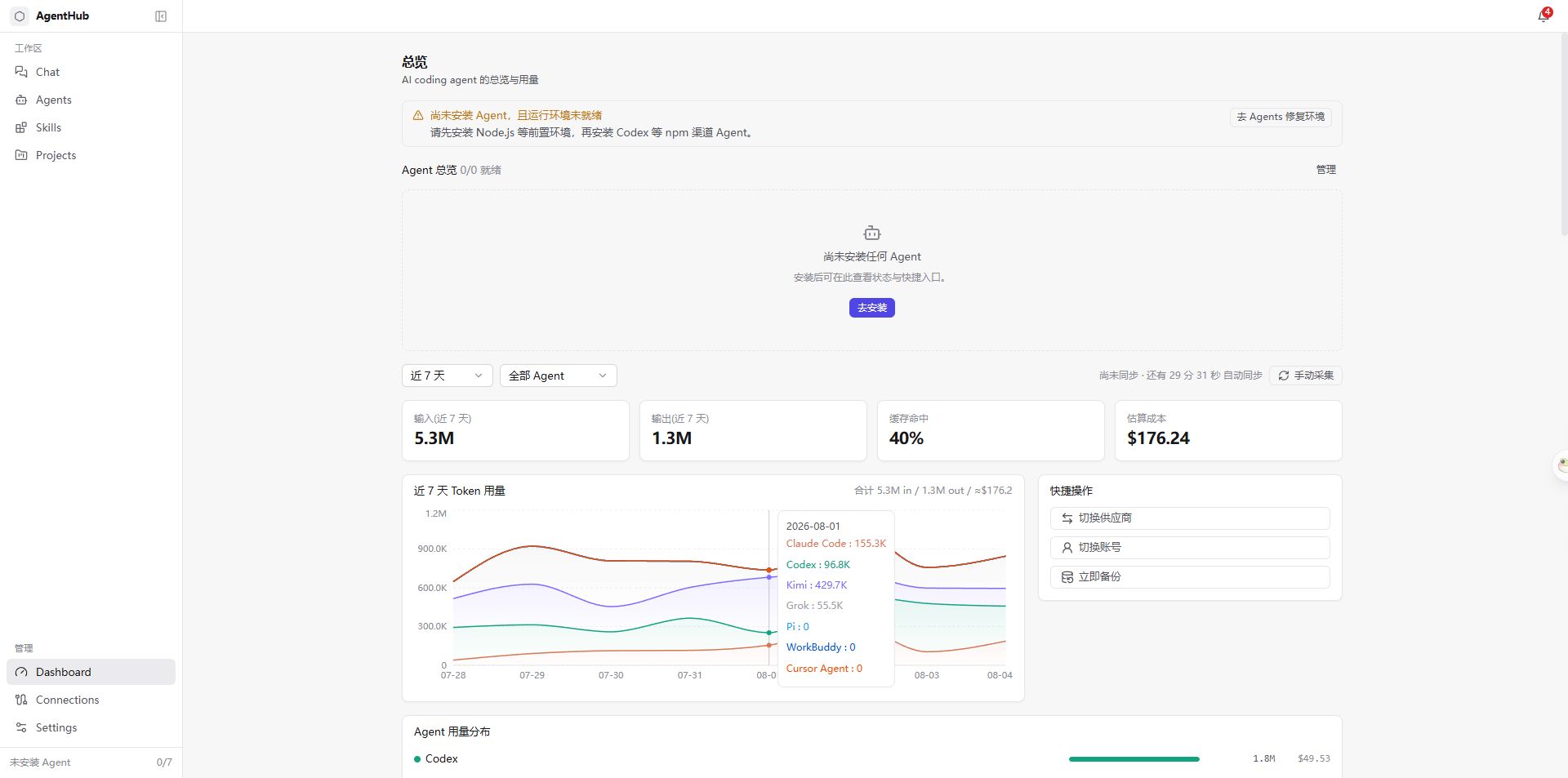
Screenshots are from the current desktop app; email addresses, local paths, API keys, and other private details are covered with white blocks. The sidebar is split into workspace and management; Settings → Features can show or hide sidebar pages. Release packages may lag the working tree — use the matching Release notes. MCP write support, plugin update, mixed vendors, and some protocol conversions are still being built and are marked in progress.
See which agents are ready, plus usage and cost estimates parsed from local logs. Go to Connections when you need to sign in or switch.
Only scans and lists MCP servers already found. It does not install them or change each tool’s settings. Write and manage are not built yet.
Lists plugin packs already installed in Claude, Grok, and Pi. Claude and Grok packs can be installed, uninstalled, enabled, or disabled here. Pi remains list-only. Update is still a proposal.
Command-line entry with doctor, env, agent, provider, account, skill, usage, backup, run, and config.
03 — Agents
Currently manages Claude Code, Codex, Kimi Code, Grok, Pi, WorkBuddy, ZCode, DeepSeek Harness, Kiro, and Cursor Agent. Cursor Agent is hidden from the sidebar and Connections by default, and can be unhidden on the Agents page.
DeepSeek Harness is not the DeepSeek API itself. Do not treat Cursor IDE as a separate agent.
04 — Architecture
The stack is Tauri v2 + React + Rust. Core logic lives in Rust; the desktop UI and the CLI are the same entry points. Each agent has its own install path, config format, and limits. AgentHub takes those differences in.
05 — Local-first
AgentHub handles local data by default. It is not a cloud console, and it does not collect usage by proxying requests.
No cloud upload · credentials follow existing storage and are redacted
06 — Quick start
Download a desktop installer for your platform, or run from source using the repository instructions.
NSIS .exe / MSI
Installer and updater are signed. Run from source with run.ps1.
Download.dmg
Updater is signed; Apple notarization is not promised. Run from source with run.sh.
Download.deb / AppImage
Packages may be unsigned. Auto-update is enabled only when the release manifest includes a signed Linux entry. Run from source with run.sh as well.
DownloadThe CLI command is agenthubCommon subcommands:doctorenvagentprovideraccountskillusagebackuprunconfigFull steps are in the repository README.
07 — FAQ
AgentHub is a local-first multi-agent desktop tool. It uses one GUI and one CLI to manage AI coding agents: install environments, logins and connections, Skills, usage, and local sessions. It does not replace Claude Code, Codex, Kimi Code, or the other tools themselves.
It currently manages Claude Code, Codex, Kimi Code, Grok, Pi, WorkBuddy, ZCode, DeepSeek Harness, Kiro, and Cursor Agent. Cursor Agent is hidden from the sidebar and Connections by default, and can be unhidden on the Agents page. Per-agent capabilities follow the repository README and the source.
No. AgentHub handles local data by default. Usage is parsed read-only from local sessions or logs. It does not intercept requests through a proxy, and it does not upload to the cloud. Local routing does not record request or response bodies.
MCP cannot be installed here. The MCP page only scans and lists services already found; it does not install them or change each tool’s settings. The Plugins page lists packs already installed for Claude, Grok, and Pi; Claude and Grok packs can be installed, uninstalled, enabled, or disabled. Pi remains list-only.
Prefer a direct connection or reuse this login. Local routing is used only when the two sides speak different protocols and a working rule already exists; otherwise the UI shows “Not supported” and does not silently forward.
Sign in to a Sub2API site to view and manage API keys by group, then import usable keys into installed agents. The sidebar entry can be shown or hidden in Settings → Features; new installs hide it by default.
Download a Windows (NSIS / MSI), macOS (.dmg), or Linux (.deb / AppImage) installer. You can also open GitHub Releases. Running from source requires Node.js LTS, Rust, Git, and pnpm.
MIT License. Source: https://github.com/nicechencs/AgentHub.
Windows, macOS, and Linux are first-class desktop platforms. The source is released under the MIT License; issues and PRs are welcome on the repository.